
Download Extended Statusbar – detailed Firefox loading metrics, free and secure
Overview
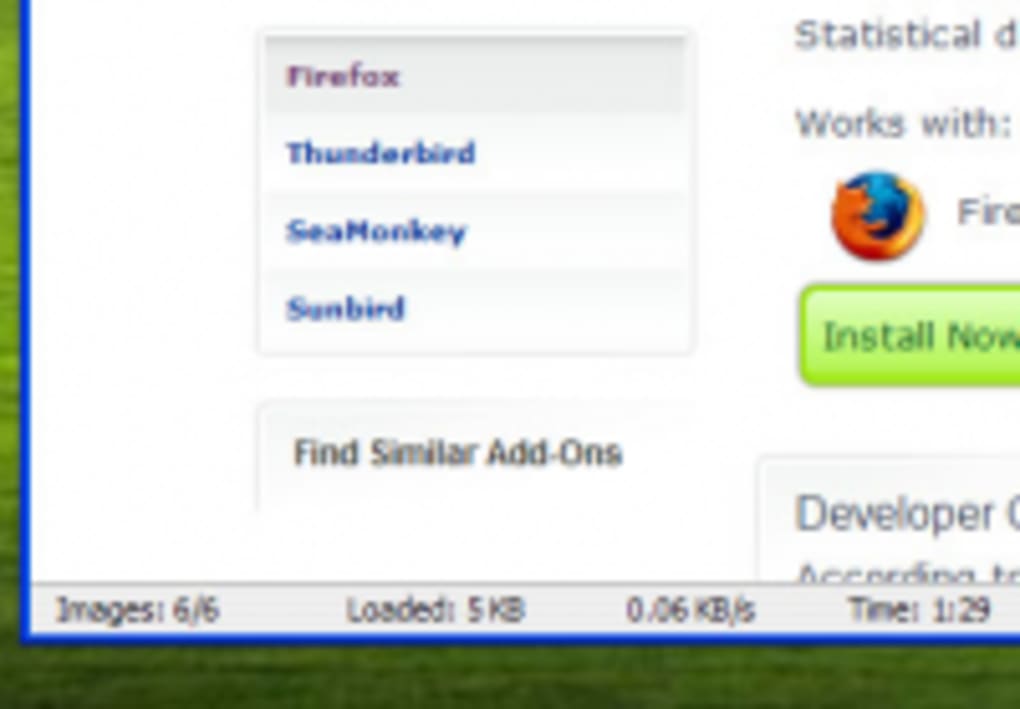
Extended Statusbar is a lightweight Firefox add‑on that expands the browser’s native status bar to reveal granular information about every page load. Instead of a simple “Loading…” message, the extension displays the exact number of images, total download size, current load speed, and a precise timer that measures how long a page takes to become interactive. For web developers, performance enthusiasts, and power users who need to diagnose bottlenecks, this level of detail can be a game‑changer.
While the add‑on keeps its footprint small, it does occupy a portion of the left‑hand side of the status bar, which can feel cramped on narrow screens or when other extensions already populate the bar. Nevertheless, the data it provides is refreshed in real time, giving you instant insight into how a site behaves under different network conditions. The tool works with Firefox 3.0 and newer, and because it’s built as a standard XUL overlay, it inherits Firefox’s security model, ensuring that the data it presents is read‑only and cannot be manipulated by malicious sites.
In short, Extended Statusbar turns the often‑overlooked status bar into a powerful diagnostic dashboard without demanding additional system resources.
Key Features
- Image Counter: Shows the exact number of image elements that have been requested during the page load.
- Load Size Tracker: Displays the cumulative size of all resources (HTML, CSS, JavaScript, images, fonts) in kilobytes.
- Speed Meter: Calculates the average download speed (KB/s) as the page loads, updating every second.
- Precise Timer: Counts the elapsed time from the first request to the moment the document is fully rendered.
- Minimal UI Footprint: Integrates seamlessly into the existing status bar, preserving the classic Firefox look.
- Low Memory Overhead: Uses less than 2 MB of RAM, making it suitable for older machines.
- Automatic Refresh: Data refreshes automatically with each navigation, no manual reset required.
- Developer‑Friendly Output: Information is displayed in plain text, allowing easy copy‑paste into bug reports or performance logs.
The feature set is intentionally focused on transparency rather than visual flair. By avoiding heavy graphics, Extended Statusbar stays fast and does not interfere with the page’s rendering pipeline. This design philosophy aligns with the needs of developers who prefer raw numbers over decorative charts. Moreover, the add‑on respects user privacy; it never sends any telemetry back to a server, keeping all metrics strictly local to the browser session.
Installation & Usage Instructions
Step‑by‑Step Installation
- Open Firefox and navigate to the official Extended Statusbar page on Mozilla Add‑Ons.
- Click the Add to Firefox button. Firefox will prompt you to confirm the installation.
- Accept the permissions request. The add‑on requires access to read page load data, which is a standard read‑only permission for performance tools.
- After installation, restart Firefox to activate the overlay. The status bar will now show the extended metrics on the left side.
How to Use the Extension
Once installed, you don’t need to open any extra windows or menus. As soon as you navigate to a new page, the left‑hand side of the status bar begins to populate with the following fields:
- Images: Number of image requests.
- Size: Total kilobytes transferred.
- Speed: Current download speed.
- Timer: Elapsed load time.
If you need to reset the counters (for example, after a long‑running tab), simply close the tab and open a new one; the extension automatically clears its internal state. For developers who work with multiple tabs, remember that Extended Statusbar currently tracks only the first opened tab. This limitation is documented in the FAQ below, but it does not affect the accuracy of the data for the active tab.
To hide the extended bar without uninstalling, right‑click the status bar area and uncheck “Extended Statusbar.” This toggle allows you to keep the add‑on installed for future use while freeing up screen real estate when you don’t need performance metrics.
Compatibility, Pros & Cons
Operating System & Browser Compatibility
Extended Statusbar is built specifically for Mozilla Firefox version 3.0 and later, which includes Firefox ESR releases up to the current stable channel. Because it is a native XUL add‑on, it runs on Windows, macOS, and Linux without any platform‑specific code. The extension does not support Firefox Quantum (Firefox 57+) as the legacy XUL framework was removed; users on newer versions must look for a WebExtension alternative. For those still using Firefox 3.x on older hardware, the add‑on remains fully functional and does not conflict with other common extensions such as Firebug or Web Developer.
Pros
- Provides real‑time, detailed load statistics directly in the browser UI.
- Lightweight and consumes minimal system resources.
- Free, open‑source, and updates automatically through Mozilla’s add‑on system.
- Ideal for web developers needing quick performance snapshots.
- No data is sent to external servers, preserving user privacy.
Cons
- Only displays information for the first opened tab; subsequent tabs inherit the same values.
- Fixed to the left side of the status bar with no repositioning options.
- Not compatible with Firefox Quantum (post‑57) due to reliance on legacy XUL.
- Can make the status bar appear crowded when many other extensions are installed.
Overall, the benefits outweigh the drawbacks for users who are comfortable staying on Firefox 3.x or who need a quick, low‑overhead performance monitor. The limitations are clearly documented, and the extension’s small size ensures that it will not degrade browser performance even on modest machines.
FAQ & Conclusion
Frequently Asked Questions
-
Does Extended Statusbar work on the latest Firefox versions?
No. The add‑on relies on the legacy XUL framework that was removed in Firefox 57 (Quantum). It works on Firefox 3.0 up to ESR 52, but users on newer versions need a WebExtension rewrite.
-
Can I move the extended status bar to the right side?
Unfortunately, the current implementation locks the display to the left side of the status bar. The source code is open, so developers could modify it, but the official release does not provide a reposition option.
-
Is the add‑on safe to use on sensitive sites?
Yes. Extended Statusbar only reads data that Firefox already knows (resource size, request count, timing). It never transmits information to external servers, making it safe for both personal and corporate environments.
-
Will the extension affect page load speed?
The impact is negligible. The add‑on observes network events without adding extra HTTP requests or heavy UI rendering, so any performance penalty is well below 1 % on typical broadband connections.
-
How do I uninstall Extended Statusbar?
Open the Firefox Add‑Ons Manager (about:addons), locate “Extended Statusbar,” click the three‑dot menu, and select “Remove.” Restart Firefox to complete the removal.
Conclusion – Should You Download Extended Statusbar?
For developers, QA engineers, and power users who still rely on Firefox 3.x or ESR releases, Extended Statusbar offers an unobtrusive yet powerful window into page‑load performance. Its real‑time metrics—image count, total size, speed, and timer—are presented directly where you already glance for loading cues, eliminating the need for external tools or network inspectors for quick checks. While the add‑on does have a few constraints (single‑tab tracking, fixed left‑hand placement, and incompatibility with modern Quantum‑based Firefox), these trade‑offs are modest compared with the insight it delivers. If you value a free, secure, and low‑resource solution that integrates seamlessly with your existing workflow, downloading Extended Statusbar is a smart move.
Ready to see exactly how fast your pages load? Download Extended Statusbar now and start measuring web performance from within Firefox itself.







